¶ B2B Logs
¶ A. Overview
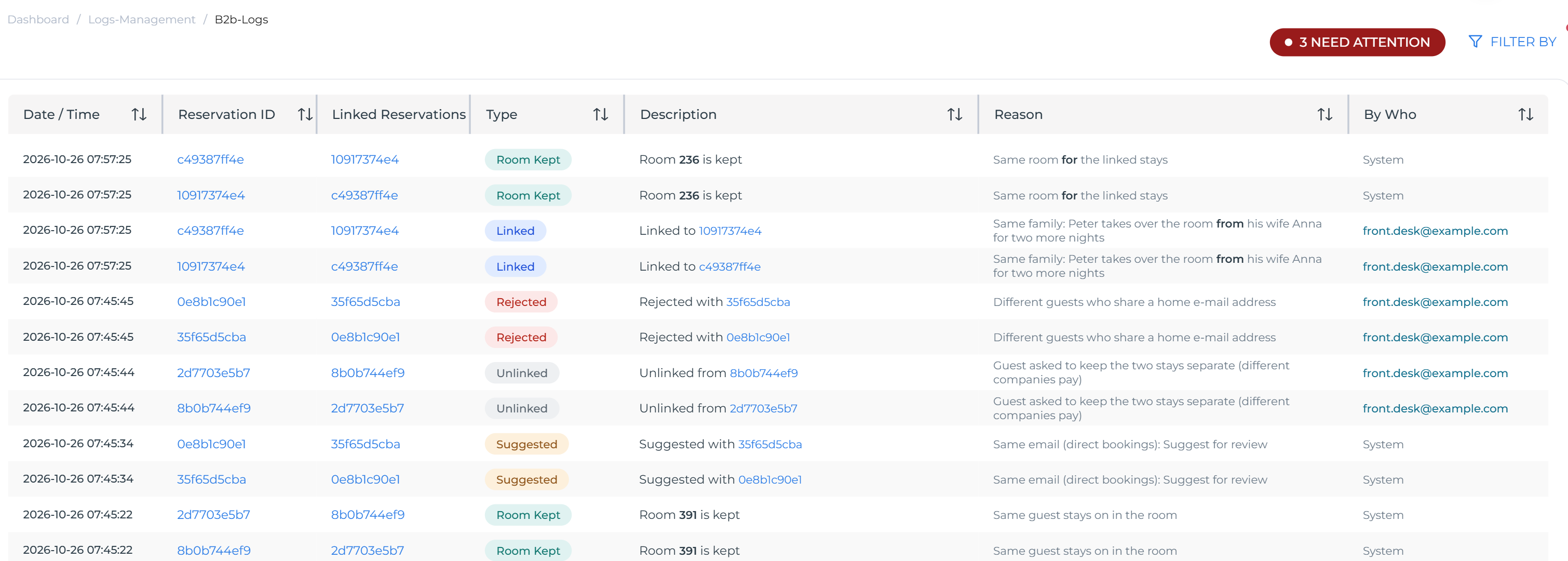
Logs › B2B Logs is the timeline of everything that happened to linked stays: who linked them and why, which room was kept, changes of guest, the changeover, and every unlink or automatic removal. Use it to answer "why are these two reservations linked?", "why did the guest change room?" or "why didn't the changeover run?".
Required permission: B2B Review.
¶ B. Columns
An action on linked stays (linked, unlinked, room kept, suggested, approved…) shows as one row, on the first stay of the chain; Linked Reservations lists the other stays. A room line is shown once per pair: in a chain of three, stays 1–2 and stays 2–3 each have their own row. Changeover, Changeover Blocked, Room Move, Guest Change and Room Not Kept keep one row per stay, because they say something different for each stay.
| Column | Description |
|---|---|
| Date / Time | When it happened, in the property's time zone. |
| Reservation ID | The reservation the row is about. Click it to open the reservation details in a new tab. |
| Linked Reservations | The stays linked with it when the row was written. |
| Type | What happened (see section C). A red dot means the row needs attention. |
| Description | A short sentence, for example "Room 236 is kept" or "Linked to 10917374e4". Room numbers and guest names are in bold. |
| Reason | Why: the matching rule and the property setting (for example "Same email (direct bookings): Suggest for review"), or the reason the staff member entered. Click to read it all. |
| By Who | System (grey), the FIRO user (their email, teal) or the guest (purple). |
¶ C. Types
| Type | Meaning |
|---|---|
| Suggested | A possible pair was created for review. |
| Approved / Rejected | A reviewer decided on a suggestion. |
| Linked | The stays were linked, automatically or by hand ("Linked by hand" with the reason). |
| Linked Again | A link came back, for example after a cancellation or a check-out was reverted. |
| Unlinked | A staff member unlinked the stays. |
| Link Removed | FIRO removed the link: a stay was cancelled or marked No-Show, the dates no longer touch, the main guest changed, the room was unassigned, or the first stay checked out early; or a suggestion was closed because a stronger match was linked instead. |
| Room Kept | The stays share one room. The reason says if FIRO moved a stay to make it possible ("Moved by the system from room 144 …") or if the front desk moved it. |
| Room Change | The plan of a changeover in two rooms ("Room 391 → 377 at the changeover") and why: different space types, or the same room was not possible. |
| Room Move | A stay's room was changed, by the system or by the front desk (change space). |
| Room Not Kept | Needs attention until it is solved (see D). The same room could not be kept for a confirmed pair. |
| Guest Change | The main guest of a stay changed: Auto Merge Guests, put back after unlink, KEE "add reservation by ID", FIRO Replace / Promote main guest. |
| Continuing Stay | A continuing stay was marked or removed by the front desk. |
| Changeover | The changeover ran: "Checked out at the changeover" on the first stay and "Checked in at the changeover" on the next one. |
| Changeover Blocked | Needs attention until it is solved (see D). The changeover could not run or is waiting (for example, the next room is not clean, or the guest has not completed the check-in). |
| Over Max Stay | Needs attention until it is solved (see D). The chain is longer than the Max Linked Stay Length; a rental agreement is needed. |
¶ D. Needs Attention
The dark red button N NEED ATTENTION next to FILTER BY shows how many rows need attention (with the other filters applied). Click it to show only those rows; click again to show everything. The button is hidden when nothing needs attention.

A row stops needing attention once its problem is solved, or once it can no longer be acted on. The row stays in the log, without the red dot:
- Room Not Kept: when the stays are back in the same room (a Room Kept row for the same pair), when the stay is unlinked, or once the changeover day has passed.
- Changeover Blocked: when the next stay is checked in at the changeover, when the stay is unlinked, or once the changeover day has passed.
- Over Max Stay: when the stay is unlinked or the link is removed.
The changeover day counts in the property's time zone: a row of today's changeover still needs attention until the end of the day.
¶ E. Filters
Click FILTER BY to open the filter panel. Changes apply only when you click APPLY; CLEAR ALL removes every filter.
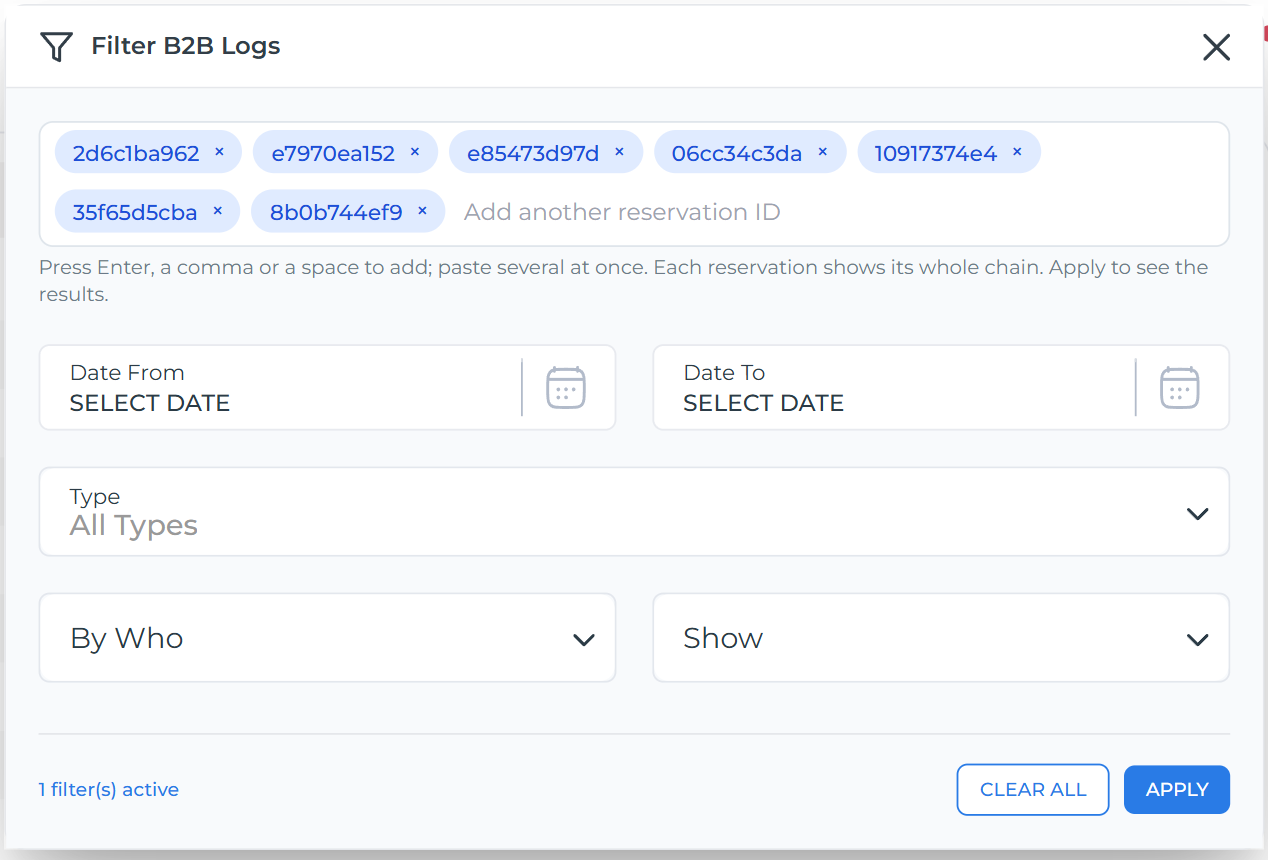
- Reservation ID: type an ID and press Enter, a comma or a space to add it as a chip. You can paste several at once (up to 25). One ID also finds the IDs that contain it; several IDs are matched exactly. Each ID brings every event of every link the stay was part of, so you see the whole chain, including chains that were joined from two separate links: any stay of the chain shows the same rows.
- Date From / Date To: the event date range.
- Type: one or several types.
- By Who: System, FIRO user or guest.
- Show: everything, or only the rows that need attention.
Tip: to investigate one guest, paste the reservation IDs of all their stays and click APPLY. The rows read as the guest's back-to-back story, newest first.