¶ Back-to-Back & Stay Changes Report
¶ A. Overview
The Back-to-Back & Stay Changes report (Reporting › Reports) shows which rooms are affected by back-to-back stays and by in-house stay changes, and what that means for housekeeping work. It is meant for shift handoff and labor planning.
The report has two views: Daily (one row per reservation and day) and Labor (the effect on check-out cleans and housekeeping credits). Both share the filters and KPI tiles at the top.
| Control | Description |
|---|---|
| Event date range | The business days to report on (default: the current month). |
| Type | All types, or one type (Back-to-back same room, room change, suggestion pending review, stay extended, stay shortened, early check-out, …). |
| Daily / Labor | Switches between the two views. |
| RELOAD / EXPORT | Refresh the data (the report does not refresh by itself: press RELOAD to see what changed since you opened it) / download Excel (with a "Labor details" sheet listing the rooms behind every labor figure). |
Every column title has a tooltip with its definition.
¶ B. KPI Tiles
| Tile | Meaning |
|---|---|
| Affected rooms today | Back-to-back rooms on today's business day: the number housekeeping plans around. |
| Confirmed pairs | Linked pairs in the period, by system and manual. |
| Pending review | Suggestions waiting for a reviewer, and how many were rejected in the period. |
| Same room kept | Pairs that keep one room (continuing stays, of which marked by the front desk) against room changes. |
| Changeovers done | Completed changeovers: automatic, by the guest in KEE, by staff, and blocked ones. |
| Stay changes | In-house stays extended or shortened. |
¶ C. Daily View
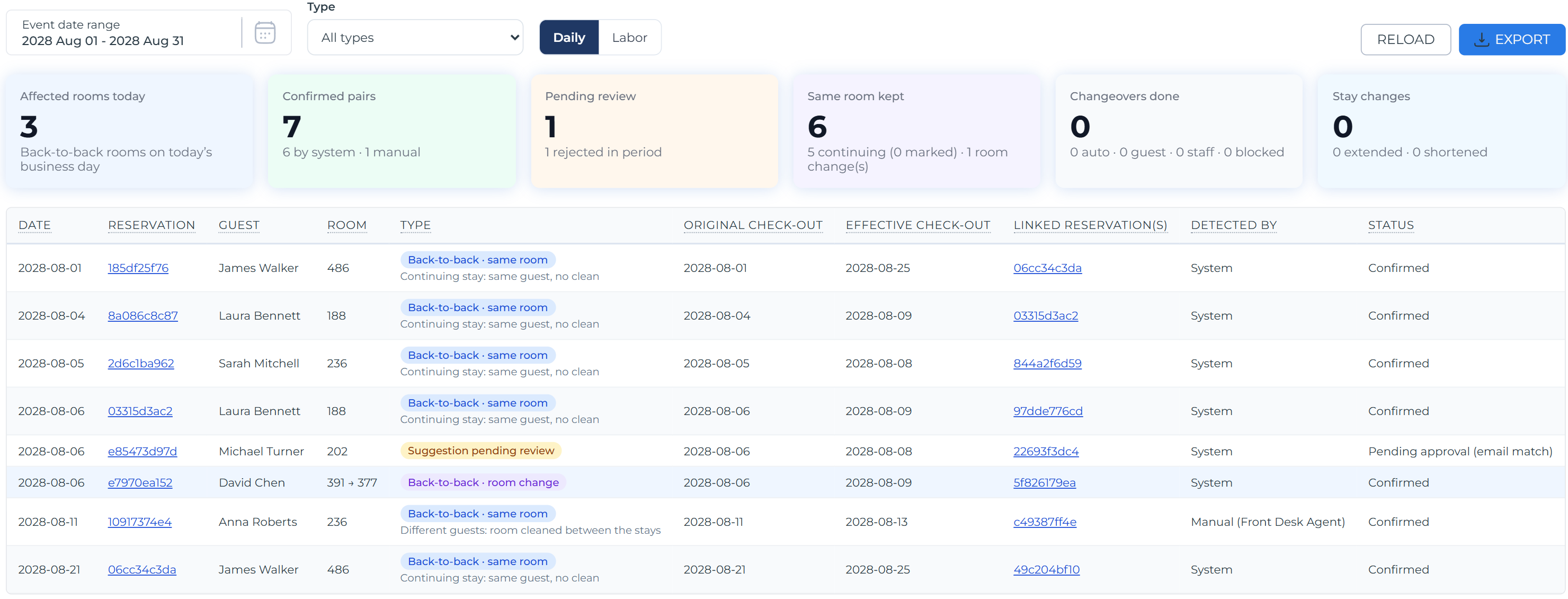
Each row is one reservation on one business day (a reservation with several rooms shows them together in the Room column):
| Column | Description |
|---|---|
| Date | Back-to-back rows: the changeover day. Stay changes: the new check-out day (for an early check-out, the day the guest left). Each change is listed once; the original date is in the Original check-out column, and the Labor view still counts both days. |
| Reservation / Guest | Confirmation number (click to open) and main guest. |
| Room | The room, or "X → Y" for a room change. |
| Type | Back-to-back · same room (with "Continuing stay: same guest, no clean" or "Different guests: room cleaned between the stays"), Back-to-back · room change, Suggestion pending review, Stay extended, Stay shortened, Early check-out. |
| Original check-out | The check-out date before the change (stay changes) or of the first stay. |
| Effective check-out | The current check-out date, the end of the linked stay, or, for a stay checked out early, the day the guest left. |
| Linked reservation(s) | The other stay(s) of the link. |
| Detected by | Back-to-back rows: System, System, approved (staff name) or Manual (staff name). Stay changes: where the latest change of the dates was made (FIRO, KEE, OTA…), or System for an early check-out. |
| Status | Back-to-back rows: Confirmed, Pending approval (with the reason), Waiting for the guest's check-in, Transition blocked, Completed (automatic / guest / manual), Removed. Stay changes: the reservation status (Reserved, In house, Checked out). |
Extended / Shortened: a reservation is extended or shortened when its check-out date is changed while it is checked in (from FIRO, KEE or the booking website). Date changes before arrival are not stay changes. A stay checked out early counts as shortened, and its effective check-out is the day the guest left.
Early check-out: a guest left before the check-out date but the reservation kept its dates (for example, a one-night stay checked out on the arrival day). It is listed once, on the day the guest left (the planned check-out day is in the Original check-out column); the Labor view counts it on both days.
The mark goes away when it no longer applies: the dates are back to the original, the check-out is reverted, or the reservation is cancelled or marked No-Show. Its rows then leave both views.
¶ D. Labor View
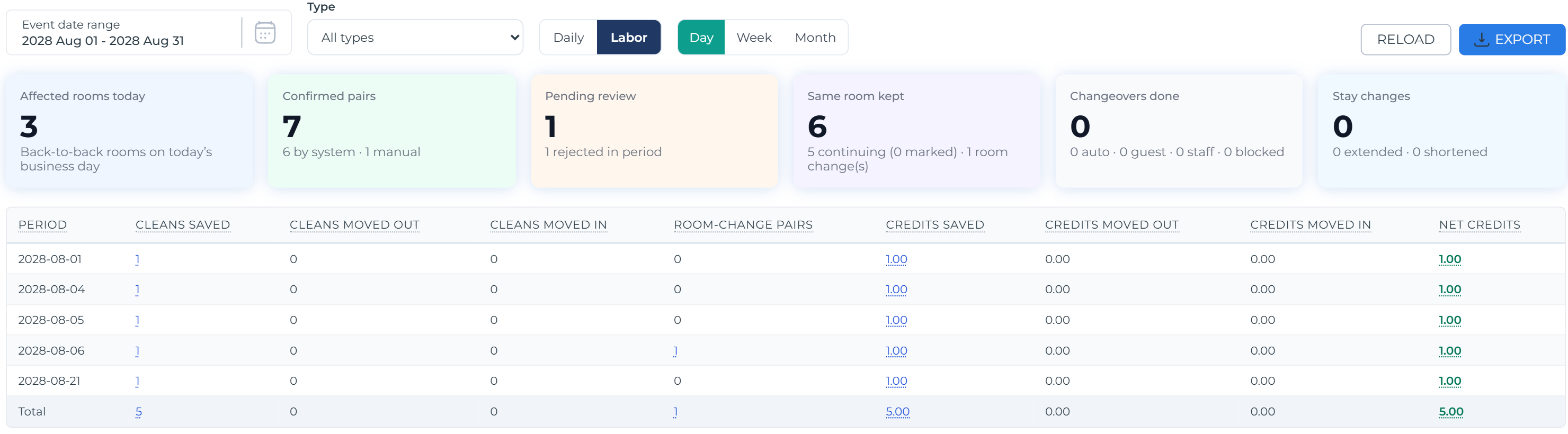
The Labor view shows the effect on housekeeping per Day, Week or Month, with a Total row. It is expressed in rooms and housekeeping credits (no currency).
| Column | Meaning | Counted on |
|---|---|---|
| Cleans saved | Check-out cleans that no longer happen at all: same-room back-to-back stays (the guest stays on, or a marked continuing stay). | Changeover day |
| Cleans moved out | Check-out cleans planned on this day that now happen on another day (stay extended, shortened, early check-out). | Original check-out day |
| Cleans moved in | Check-out cleans that now happen on this day instead of their planned day. | New check-out day (early check-out: the day the guest left) |
| Room-change pairs | One per changeover where the guest moves room. No clean is saved or moved: the old room gets its normal clean and the new room is cleaned first. | Changeover day |
| Credits saved / moved out / moved in | The room type's check-out clean credits for each figure. | |
| Net credits | Saved + moved out − moved in. Green when positive (less work than planned), red when negative (more work). |
Over a period that contains both days of a stay change, the moved-out and moved-in cleans cancel out, so only the real savings remain.
Rooms behind a figure
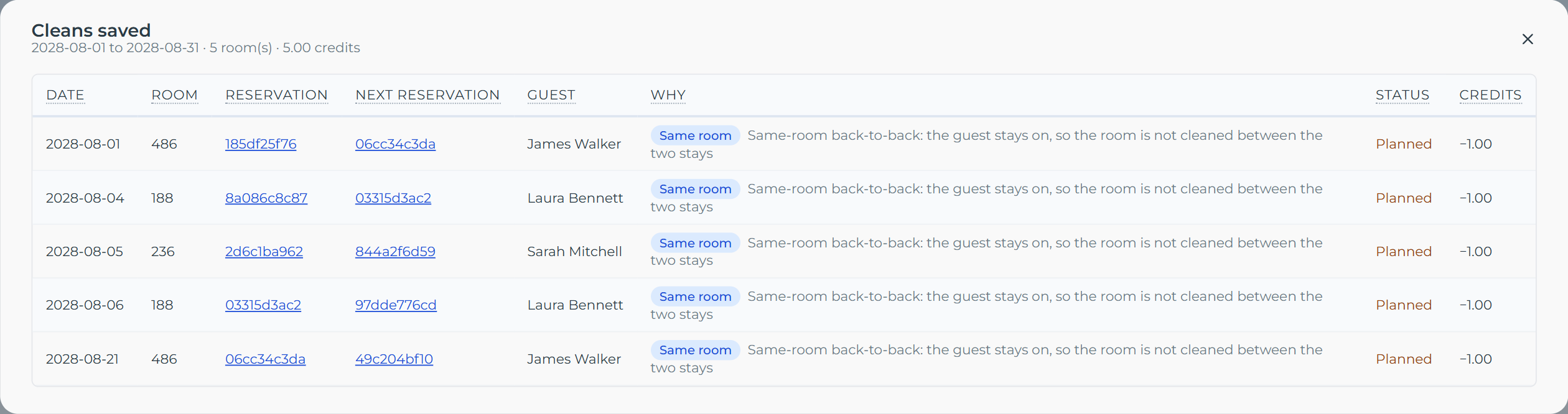
Click any figure (including totals and credits) to see the rooms behind it: date, room, reservation and next reservation (links), guest, why (for example Same room, Extended), status and credits. Planned means still to come; Done means the day has passed or the changeover / check-out already happened.