¶ Back-to-Back Configuration
¶ A. Overview
The back-to-back settings are per property, in Configuration › General Configuration, in the Back-to-Back Reservations card. Click the Back-to-Back pill at the top of the page to jump to it. Click Save Configuration at the bottom of the page to apply changes.
The card controls three things:
- whether FIRO links consecutive stays automatically, and the maximum length of a linked stay;
- the matching criteria: which guest matches link automatically, which are suggested for review, and which are ignored;
- the room-change options offered to linked guests in KEE: a late checkout on the departing stay and an early check-in to the next stay.
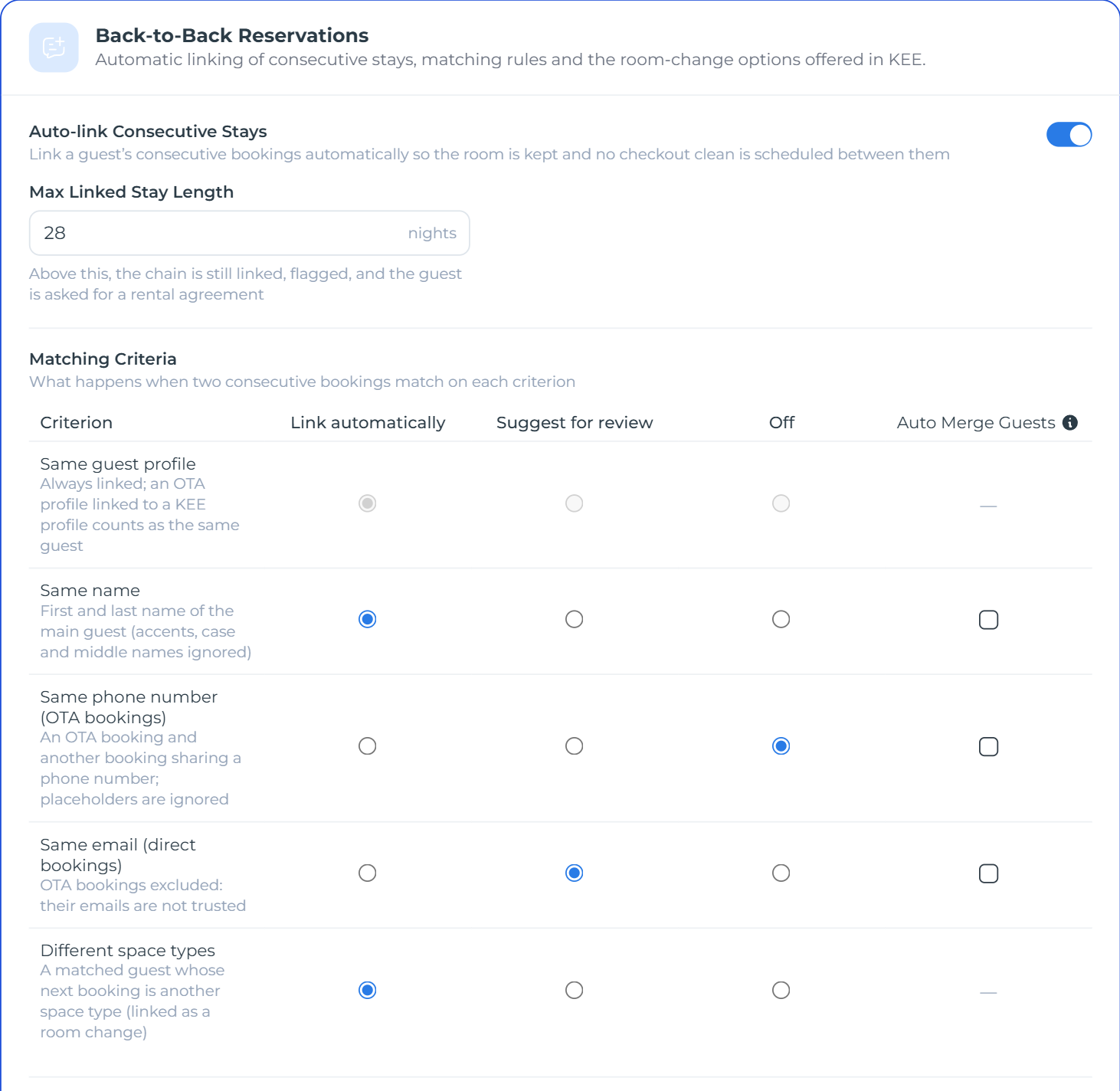
¶ B. Auto-link Consecutive Stays and Max Linked Stay Length
| Setting | Description |
|---|---|
| Auto-link Consecutive Stays |
On: FIRO looks for back-to-back stays automatically and links or suggests them using the matching criteria. When you turn it on, FIRO immediately checks all future reservations once. Off: no automatic linking, no suggestions and no automatic room assignment. Staff can still link stays by hand, and a manual link gets the full back-to-back behaviour (same room, automatic changeover, housekeeping). |
| Max Linked Stay Length | From 1 to 200 nights (default 28). When the total nights of a chain go above this value, the stays are still linked, but the chain is flagged ("Over Max Stay" in B2B Logs, RENTAL tag in the reservation list) and the guest is asked for a rental agreement. It also applies to manual links. |
¶ C. Matching Criteria
Matching compares the main guest of the two reservations (invited guests are not compared). For each criterion choose what happens when two consecutive bookings match:
- Link automatically: the stays are linked straight away.
- Suggest for review: a suggestion is created and shows as B2B Needs Review. Nothing changes for the guest, the room or housekeeping until a reviewer approves it.
- Off: this criterion is ignored.
When several criteria match, the strongest result wins (link over suggest over off). The matching criteria are used only while Auto-link Consecutive Stays is on; otherwise they are greyed out.
| Criterion | Default | Notes |
|---|---|---|
| Same guest profile | Link automatically (fixed) | Cannot be changed. An OTA profile that the guest added to their KEE profile counts as the same guest. |
| Same name | Link automatically | First and last name of the main guest. Accents, letter case and middle names are ignored. |
| Same phone number (OTA bookings) | Off | An OTA booking and another booking sharing a phone number. Placeholder numbers (such as 1111111, or fewer than 7 digits) never match. |
| Same email (direct bookings) | Suggest for review | OTA bookings are excluded because their emails are not reliable. Several KEE profiles can share an email (for example, a family), so a review is recommended. |
| Different space types | Link automatically | A matched guest whose next booking is another space type. The stays are linked as a room change: the guest moves room on the changeover day. |
Auto Merge Guests
The Auto Merge Guests checkbox (one per name / phone / email row, off by default) gives linked stays one main guest. When stays are linked automatically by that criterion:
- OTA and visitor stays take the official KEE guest of the chain as main guest; if there is none, they take the first stay's guest, so the key in use continues.
- An official KEE guest is never replaced, and two different official guests are never merged.
- The guest profiles themselves are not merged. A stay unlinked before its check-in gets its own guest back.
- When the stays end up with one main guest in one room, the changeover runs as the same guest staying on: automatic check-out and check-in, no clean.
Every merge and put-back appears in B2B Logs as a Guest Change row.
¶ D. Room-Change Options (Late Checkout and Early Check-in)
When a linked guest has to change rooms, or another guest takes over the room, the property can offer two courtesies in KEE. They are regular add-on amenities, so the times come from each option.
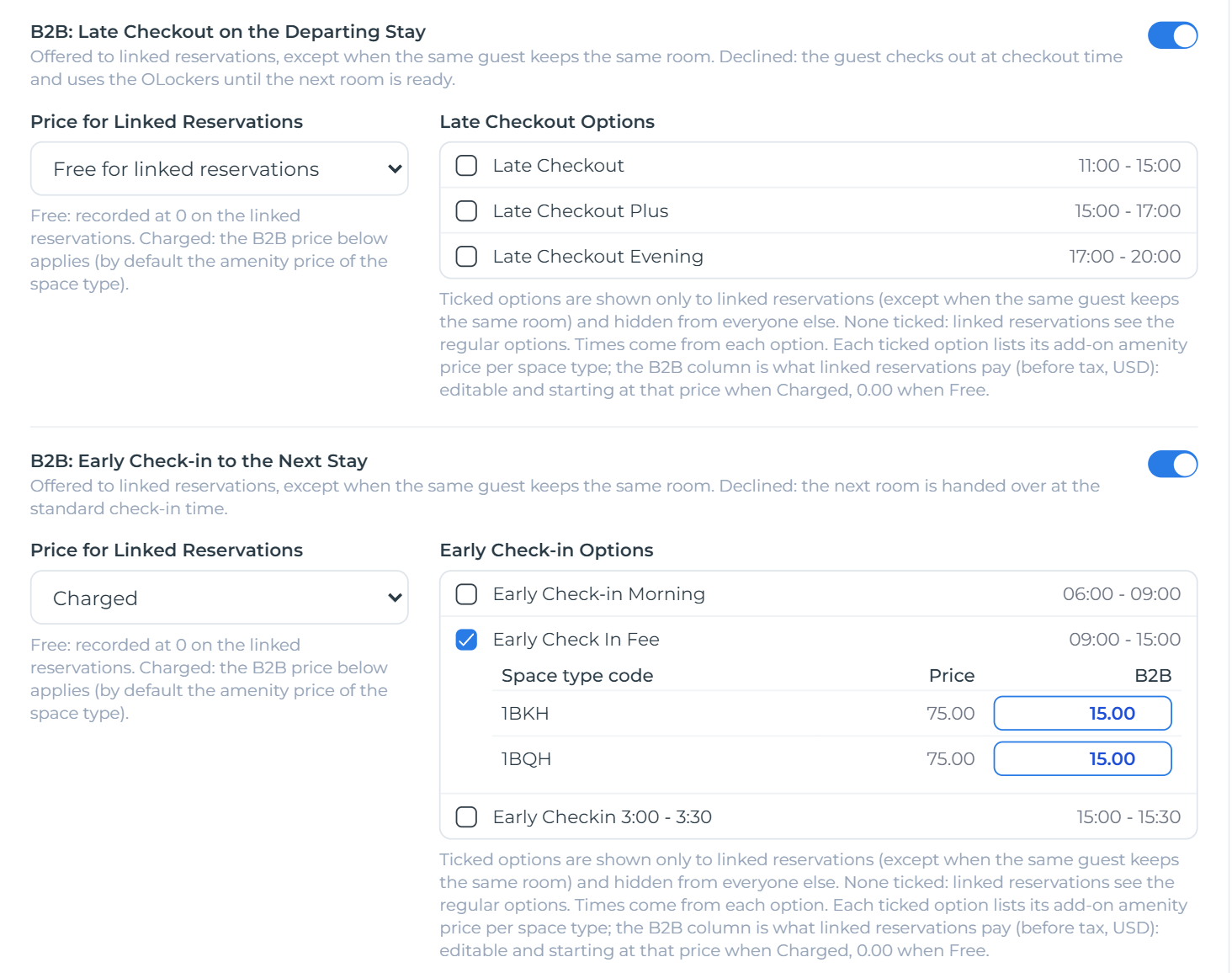
| Setting | Description |
|---|---|
| B2B: Late Checkout on the Departing Stay | Offers a late checkout on the first stay to linked reservations, except when the same guest keeps the same room (that guest does not need to leave). If declined, the guest checks out at the check-out time and can use the OLockers until the next room is ready. |
| B2B: Early Check-in to the Next Stay | Offers an early check-in on the next stay to linked reservations, with the same exception. If declined, the next room is handed over at the standard check-in time. The option is offered until the hand-over, including on the changeover day. |
| Price for Linked Reservations | Free for linked reservations: the option is recorded on the reservation at 0.00. Charged: the B2B price per space type applies. It starts at the add-on amenity price and can be changed (two decimals, before tax). |
| Late Checkout Options / Early Check-in Options |
Lists the late checkout / early check-in add-on amenities of the property with their time windows. Ticked options are the only ones a linked reservation sees on its room change, at the B2B price (or free). Use this to offer a special time window or price to linked guests. Each ticked option lists its space types with the amenity price and the editable B2B price. Other reservations are not affected by these settings: a reservation that is not linked sees every enabled late checkout / early check-in option, ticked ones included, at the regular add-on amenity price. None ticked: linked reservations see the regular options. |
Tip: an option is offered only when it is priced for every space type of the reservation. For a reservation with several rooms, the price is the sum per room. This applies to linked reservations too: a B2B price does not replace a missing add-on amenity price for a space type.
The front desk can also add these options from the reservation's Amenities widget (ADD ADD-ON). They take effect exactly as if the guest had bought them in KEE (housekeeping and door access follow).
¶ E. Related Settings
- Check-in Time / Check-out Time (Reservation Rules): the default hand-over and departure times of a changeover.
- Auto Check-out and Auto Check-out Margin (Automation & Revert Windows): change the time of a same-guest, same-room changeover (see The Changeover Day).
- Positions: grant the B2B permissions (see Back-to-Back Reservations, section E).